
Detect. Recover. Verify.
Bring monitoring, investigation, and recovery into a connected operational workflow. Observatory helps teams respond through approved actions, service-aware policies, and clear evidence of recovery.
- DETECTA dependency fault is picked up by monitoring.
- DIAGNOSEThe affected path is traced and investigated.
- AUTHORIZERecovery policy decides what may run, and who approves.
- RECOVERThe approved workflow runs.
- VERIFYChecks confirm the service works again.
- Likely cause · dependency degraded
- Impact · Orders API → Customer portal
- Evidence · correlated signals and changes
- Service · production
- Mode · approval required
- Approver · authorized operator
- Workflow · approved restart of the dependency
- Resource health
- Application check
- Synthetic check
- A dependency develops a visible fault.
- The lighthouse beam reveals the affected service path.
- An investigation card links the evidence.
- A recovery-policy checkpoint appears: approval is required.
- The approved action progresses.
- Verification checks complete.
- The service returns to a stable state.
ILLUSTRATIVE RECOVERY WORKFLOW · CONCEPTUAL, NOT A PRODUCT RECORDING
See every step toward service restoration.
- DetectMonitoring picks up operational symptoms across services, applications and infrastructure.
- InvestigateSignals are correlated and likely causes investigated along the service's dependencies.
- SelectAn applicable recovery workflow is selected for the affected resource and service.
- AuthorizePermissions and approval requirements are applied before anything changes.
- ExecuteThe authorized response runs. If a step fails, compensating steps can undo the work already done.
- VerifyChecks confirm functionality, and the service is observed for stability.
- RetainThe run, its approvals and its evidence are kept, and recovery knowledge is reviewed before reuse.
Automation that follows your operating policy.
Collect evidence and identify recovery opportunities.
Prepare a proposed response for review.
Execute after authorized approval.
Run approved recovery workflows within defined limits.
Set different policies for development, testing, and production services. Keep operators informed about what is permitted, what is running, and what needs attention.
Some limits are fixed. Destructive actions always wait for a person, even under automation. When a person requests a recovery run, a different person must approve it.
Understand dependencies before making changes.
Infrastructure actions can affect multiple applications and teams. Connect recovery decisions to service dependencies, available capacity, and the impact of concurrent changes.
CONCEPTUAL DIAGRAM
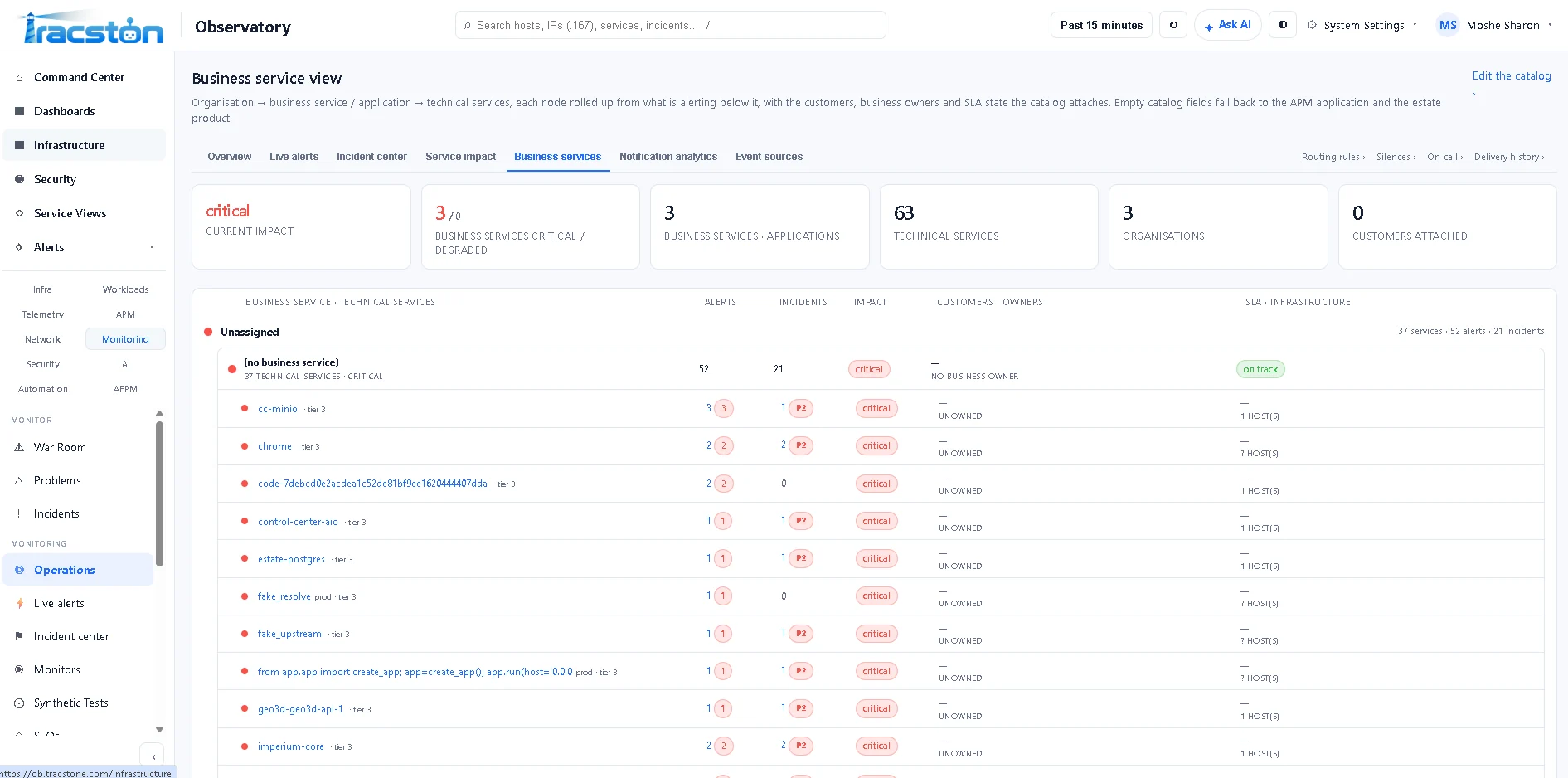
PRODUCT SCREENSHOT — BUSINESS SERVICES, THE SERVICE CONTEXT THAT RECOVERY DECISIONS DRAW ON
Use proven workflows. Bring in AI when investigation needs more help.
Known incidents can follow approved recovery workflows. For unfamiliar problems, AI-assisted investigation can help analyze evidence and propose next steps within configured permissions.
How that works today: a workflow drafted with AI starts disabled, and a person has to promote it before it can run. AI proposals go through the same authorization and execution controls as any other recovery plan.
Every recovery, in plain view.
Operators can see each recovery from start to finish in the Observatory console. We show these screens live rather than as mock-ups.
CONCEPTUAL VIEW · NOT A PRODUCT SCREENSHOT
One recovery model, two kinds of estate.
Infrastructure and applications
- Service failures
- Dependency issues
- Configuration problems
- Approved operational recovery
AI workflows IN DEVELOPMENT
- Model endpoint failures
- Tool errors
- Stalled flows
- Policy-approved recovery paths through AFPM
Available now: AFPM traces AI flows and shows where they fail. Coming next: recovery for AI flows, built on the same policy, approval and verification controls as infrastructure recovery. About AFPM →
Recovery that works where your estate runs.
Recovery actions run through Spectient, Tracston's agent that runs next to your systems, or through supported agentless integrations such as SSH, WinRM, Kubernetes, Docker, Proxmox and AWX.
Observatory looks after itself too. A built-in watchdog finds and repairs faults in Observatory's own collectors and queues. It is not allowed to delete data.
Self-Healing FAQ
Does every recovery require AI?
No. Known recovery workflows run deterministically, without an LLM. AI-assisted investigation can be used when it is enabled and appropriate. It works through defined tools within configured permissions, and in production it is limited to recommending a response.
Can production changes require approval?
Yes. Recovery policy can require approval and restrict which actions are permitted for production services. Destructive actions always wait for a person, whatever the automation level. When a person requests a recovery run, a different person must approve it.
How is recovery verified?
Verification can combine resource health, service and application checks, metrics and service-level objectives, and synthetic checks against user-facing endpoints, depending on the configured service. A workflow step that completes is not treated as recovery until those checks pass.
Can Observatory work without Imperium?
Yes. Observatory includes its own recovery controls: policies, approvals, verification and audit history. Imperium is a separate Tracston product and is not required for recovery. The two connect when both are deployed.
Does recovery permanently fix every problem?
No. Some actions restore availability while a permanent correction still needs investigation. Recovery workflows can open a ticket so that follow-up work is recorded, and lessons from repeated recoveries feed back into recovery policy.
Capabilities are enabled according to deployment and licensing. Recovery depends on your configuration and environment; no recovery outcome is guaranteed.